Connections
The Connections module is a core component of PLCVisu, enabling seamless communication between the visual interface and the backend logic. It acts as a bridge between client-side widgets—such as gauges, bar graphs, and outputs—and the PLC or backend program where real-time data is processed. As variable values change on the backend, the Connections module ensures those updates are instantly delivered to the client (typically a web browser), allowing for dynamic and accurate data visualization within the HMI.
Connection Types
Currently, PLCVisu supports the PLC connection type, designed specifically for integration with WAGO PLCs. Additional connection types will be introduced in future versions.
PLC Connection
PLCVisu Protocol
The standard PLCVisu protocol provides real-time communication over WebSockets by exchanging structured messages between the client and backend. It follows a request-response pattern: widgets subscribe to specific variables, and updates are pushed whenever those values change. This approach ensures efficient data flow while keeping system resource usage minimal. PLCVisu is fully integrated with the PLC connection type, making it ideal for responsive, real-time HMI applications.
PLCVisu Static Protocol
PLCVisu Static is a variant of the PLCVisu protocol, optimized for performance. It maintains a continuous WebSocket connection and remains subscribed to all relevant data in the background.
How It Works
Once connected, PLCVisu Static continuously receives and stores subscribed data in memory. Visualizations then read directly from this memory cache rather than requesting data from the source each time.
Key Points
Faster display performance – Page transitions are nearly instantaneous, as data is preloaded.
Higher resource usage – All subscribed data remains active, which can increase memory and processing demands.
CODESYS Back-end
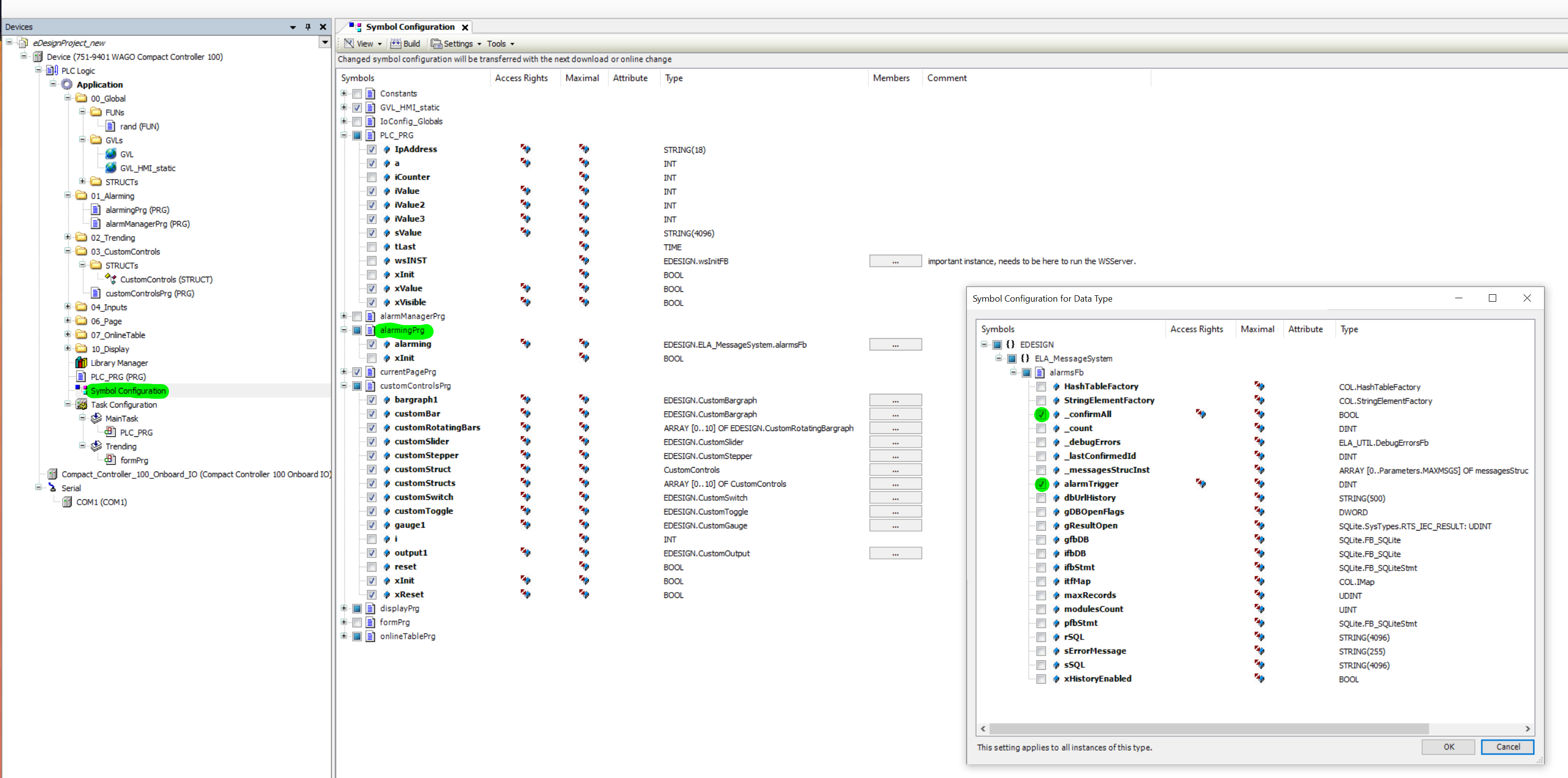
To make variables available through the PLCVisu interface, it is essential to configure the Symbol Configuration within your CODESYS project. This step exposes the necessary variables for use in the HMI. In the Symbol Configuration, you must explicitly mark which variables should be visible. The screenshot below illustrates an example Symbol Configuration that includes detailed alarm-related variables, ensuring they can be accessed and visualized through the Connections module in PLCVISU.