

Pages
Özel Anahtar (Custom Switch)
Custom Switch (Özel Anahtar), kullanıcıların üç farklı durum arasında geçiş yapmasını sağlayan çok amaçlı bir bileşendir.
Düşük, orta ve yüksek seviye gibi çok kademeli kontrol ihtiyaçları ya da sistem modları arasında geçiş için idealdir.

Genel Bakış
Custom Switch, kullanıcıya üç önceden tanımlanmış durum arasında geçiş yapma imkânı tanır.
Her durum görsel olarak net şekilde temsil edilir, böylece kullanıcılar hangi durumda olduklarını kolayca anlayabilir ve geçiş yapabilir.
Temel Özellikler
Üç Durumlu Anahtar
- Üç durum arasında geçiş sağlar (örn. Düşük / Orta / Yüksek ya da Kapalı / Bekleme / Açık)
- Her durum farklı renk, simge veya etiketle tanımlanabilir
Gerçek Zamanlı Durum Göstergesi
- Seçili durum anında yansıtılır, kullanıcıya net geri bildirim sağlar
Özelleştirilebilir Görünüm
- Renk, boyut ve stil gibi özellikler tema veya arayüzle uyumlu olacak şekilde ayarlanabilir
Durum Geçiş Geri Bildirimi
- Görsel, sesli veya titreşimli geri bildirim eklenebilir
Kullanım Senaryoları
Sistem Modları
- Örnek: Cihaz güç modları arasında geçiş yapmak (Düşük / Orta / Yüksek)
Çok Kademeli Kontroller
- Örnek: Aydınlatma, klima veya ısıtma sisteminde üç seviye kontrol
Cihaz Yönetimi
- Örnek: Makineyi Kapalı, Beklemede veya Açık modları arasında döngüsel olarak çalıştırmak
SVG ID Referans Tablosu
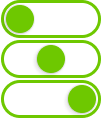
| # | Eleman | SVG ID |
|---|---|---|
| 1 | Durum 1 (State 1) | gState_1 |
| 2 | Durum 2 (State 2) | gState_2 |
| 3 | Durum 3 (State 3) | gState_3 |
| 4 | Kaydırıcı (Thumb) | thumb |
Kod Örneği
<g id="gState_1">
<rect class="fallback-switch-background custom-control custom-switch custom-switch-background" id="Rectangle 1" x="2.5" y="1.5" width="97" height="35" rx="17.5" stroke-width="3"/>
<g id="thumb">
<g  class="fallback-switch-thumb custom-control custom-switch custom-switch-thumb" id="circle" filter="url(#filter0_d_323_297)">
<circle cx="20" cy="19" r="15"/>
<circle cx="20" cy="19" r="14.5" stroke="url(#paint0_linear_323_297)"/>
</g>
</g>
</g>
<g id="gState_2">
<rect class="fallback-switch-background custom-control custom-switch custom-switch-background" id="Rectangle 1_2" x="2.5" y="1.5" width="97" height="35" rx="17.5"  stroke-width="3"/>
<g  class="fallback-switch-thumb custom-control custom-switch custom-switch-thumb" id="thumb_2">
<g id="circle_2" filter="url(#filter1_d_323_297)">
<circle cx="51" cy="19" r="15" />
<circle cx="51" cy="19" r="14.5" stroke="url(#paint1_linear_323_297)"/>
</g>
</g>
</g>
<g id="gState_3">
<rect  class="fallback-switch-background custom-control custom-switch custom-switch-background" id="Rectangle 1_3" x="2.5" y="1.5" width="97" height="35" rx="17.5"  stroke-width="3"/>
<g class="fallback-switch-thumb custom-control custom-switch custom-switch-thumb" id="thumb_3">
<g id="circle_3" filter="url(#filter2_d_323_297)">
<circle cx="82" cy="19" r="15" />
<circle cx="82" cy="19" r="14.5" stroke="url(#paint2_linear_323_297)"/>
</g>
</g>
</g>
<g id="gState_1">
<rect class="fallback-switch-background custom-control custom-switch custom-switch-background" id="Rectangle 1" x="2.5" y="1.5" width="97" height="35" rx="17.5" stroke-width="3"/>
<g id="thumb">
<g class="fallback-switch-thumb custom-control custom-switch custom-switch-thumb" id="circle" filter="url(#filter0_d_323_297)">
<circle cx="20" cy="19" r="15"/>
<circle cx="20" cy="19" r="14.5" stroke="url(#paint0_linear_323_297)"/>
</g>
</g>
</g>
<g id="gState_2">
<rect class="fallback-switch-background custom-control custom-switch custom-switch-background" id="Rectangle 1_2" x="2.5" y="1.5" width="97" height="35" rx="17.5" stroke-width="3"/>
<g class="fallback-switch-thumb custom-control custom-switch custom-switch-thumb" id="thumb_2">
<g id="circle_2" filter="url(#filter1_d_323_297)">
<circle cx="51" cy="19" r="15" />
<circle cx="51" cy="19" r="14.5" stroke="url(#paint1_linear_323_297)"/>
</g>
</g>
</g>
<g id="gState_3">
<rect class="fallback-switch-background custom-control custom-switch custom-switch-background" id="Rectangle 1_3" x="2.5" y="1.5" width="97" height="35" rx="17.5" stroke-width="3"/>
<g class="fallback-switch-thumb custom-control custom-switch custom-switch-thumb" id="thumb_3">
<g id="circle_3" filter="url(#filter2_d_323_297)">
<circle cx="82" cy="19" r="15" />
<circle cx="82" cy="19" r="14.5" stroke="url(#paint2_linear_323_297)"/>
</g>
</g>
</g>
thumb
gState_3
gState_2
gState_1
# **Custom Switch**
The **Custom Switch** control is a versatile widget that allows users to toggle between three distinct states. It is ideal for controlling systems or devices that require a middle state, such as selecting between low, medium, and high settings or enabling multiple system modes.


## **Overview**
The **Custom Switch** enables users to cycle through three predefined states, providing more flexibility than a typical toggle. Each state is visually represented, ensuring users can quickly identify and switch between them.
## **Key Features**
### **Three-State Switch**
- Toggle between **three** states (e.g., Low, Medium, High, or Off, Standby, On).
- Each state is clearly indicated with distinct colors, icons, or labels.
### **Real-Time State Reflection**
- The switch immediately reflects the current state, giving users visual feedback for better interaction.
### **Configurable Appearance**
- Adjust the switch’s appearance, including colors, size, and style, to match the system’s theme or design.
### **State Change Feedback**
- Provide visual, auditory, or haptic feedback when switching between states to improve the user experience.
## **Use Cases**
### **System Modes**
- Example: Switch between different modes of a device, such as Low, Medium, and High power settings.
### **Multi-Level Controls**
- Example: Control intensity levels in systems like lighting, air conditioning, or heating with three distinct settings.
### **Device Management**
- Example: Cycle through three operational states of a machine, such as Off, Standby, and On.
## **SVG ID Reference Table**

| **#** | **Element** | **SVG ID** |
|------:|-----------------------------------|--------------------------|
| 1 | State 1 | `gState1` |
| 2 | State 2 | `gState2` |
| 3 | State 3 | `gState3` |
| 4 | Thumb | `thumb` |
## **Code Snippet Example**
```