

Pages
Kontrol: Özel Giriş Adımlayıcı(Custom Input Stepper)
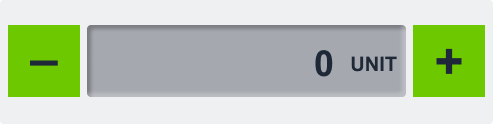
Custom Input Stepper (Özel Giriş Adımlayıcı), kullanıcıların + ve â düğmeleriyle sayısal bir değeri adım adım değiştirmesine olanak tanıyan sezgisel bir kontrol bileşenidir.
Birim görüntüleme, adım boyutu ayarı ve değer sınırları desteği ile gerçek zamanlı sistem parametresi ayarlamaları için idealdir.
Genel Bakış
Bu bileşen; sıcaklık, parlaklık veya basınç gibi parametrelerin hassas bir şekilde ayarlanmasını sağlar.
CODESYS veya MQTT gibi dış sistemlere bağlantı desteği sayesinde değer değişimleri anlık olarak yansıtılır.
Temel Özellikler
Artır/Azalt Kontrolleri
- Kullanıcılar
+veâdüğmeleriyle değeri değiştirir - Manuel giriş hatalarını önler, kullanım kolaylığı sağlar
Gerçek Zamanlı Veri Bağlantısı
- CODESYS, MQTT gibi veri kaynaklarıyla entegre çalışır
- Her adım değişiminde güncel değer gönderilir
Adım Boyutu Ayarı
- 0.5, 1, 5 gibi özel adım aralıkları tanımlanabilir
- Hem ince hem kaba ayarlama modları desteklenir
Min/Maks Değer Sınırları
- Güvenli kullanım için minimum ve maksimum sınırlar belirlenebilir
- Geçersiz veya riskli değerlerin ayarlanması engellenir
Birim Gösterimi
- °C, bar, % gibi birim etiketleri değerin yanında gösterilebilir
- Daha iyi anlaşılırlık ve bağlam sağlar
Kompakt ve Görsel Tasarım
- Değişimlerin görsel olarak net bir şekilde iletildiği kompakt yapı
- Ayar menülerine veya kontrol panellerine kolayca entegre edilir
Kullanım Senaryoları
Sıcaklık Kontrolü
- Örnek: Bir ısıtıcı elemanın değerini güvenli aralıkta ayarlamak
Parlaklık Ayarları
- Örnek: Ekran ya da oda parlaklığını belirli adımlarla ayarlamak
Basınç veya Hız Ayarları
- Örnek: Pompa basıncını veya konveyör hızını hassas şekilde ayarlamak
SVG ID Referans Tablosu
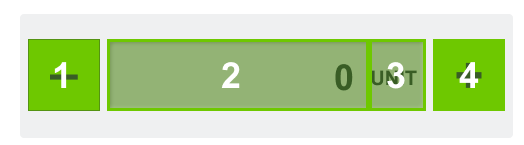
Aşağıdaki SVG ID’lerini kullanarak görsel öğeleri ve veri bağlantısını tanımlayabilirsiniz:
| # | Öğe | SVG ID |
|---|---|---|
| 1 | Eksi Butonu | gButtonMinus |
| 2 | Değer | dValue_value |
| 3 | Birim (isteğe bağlı) | dUnit_value |
| 4 | Artı Butonu | gButtonPlus |
Kod Örneği(Code Snippet Example)
<g id="gValue">
<g id="Rectangle 4708" filter="url(#filter0_ii_337_934)">
<rect class="fallback-stepper-value-background custom-control custom-input-stepper stepper-value-background" x="87" y="25" width="319" height="72" rx="4"/>
</g>
<g id="gUnit">
<text class="fallback-stepper-value custom-control custom-input-stepper stepper-value" xml:space="preserve" style="white-space: pre" font-family="Arial" font-size="20" font-weight="bold" letter-spacing="0em"><tspan id="dUnit_value" x="350.301" y="70.9336">UNIT</tspan></text>
</g>
<g id="gValue">
<text class="fallback-stepper-unit custom-control custom-input-stepper stepper-unit" id="value_tspan" text-anchor="end"  xml:space="preserve" style="white-space: pre" font-family="Arial" font-size="36" font-weight="bold" letter-spacing="0em"><tspan id="dValue_value" x="330" y="76.4805">9</tspan></text>
</g>
</g>
<g id="gButtonPlus">
<rect class="fallback-stepper-btn-background custom-control custom-input-stepper stepper-btn-background" id="Rectangle 4710" x="413" y="25" width="72" height="72"/>
<text class="fallback-stepper-btn-color custom-control custom-input-stepper stepper-btn-color" id="+" xml:space="preserve" style="white-space: pre" font-family="Arial" font-size="50" font-weight="bold" letter-spacing="0em"><tspan x="434.4" y="79.334">+</tspan></text>
</g>
<g id="gButtonMinus">
<rect class="fallback-stepper-btn-background custom-control custom-input-stepper stepper-btn-background" id="Rectangle 4709" x="8" y="25" width="72" height="72"/>
<text  class="fallback-stepper-btn-color custom-control custom-input-stepper stepper-btn-color" id="minus" xml:space="preserve" style="white-space: pre" font-family="Arial" font-size="50" font-weight="bold" letter-spacing="0em"><tspan x="30.084" y="76.334">-</tspan></text>
</g>
</g>
<g id="gValue">
<g id="Rectangle 4708" filter="url(#filter0_ii_337_934)">
<rect class="fallback-stepper-value-background custom-control custom-input-stepper stepper-value-background" x="87" y="25" width="319" height="72" rx="4"/>
</g>
<g id="gUnit">
<text class="fallback-stepper-value custom-control custom-input-stepper stepper-value" xml:space="preserve" style="white-space: pre" font-family="Arial" font-size="20" font-weight="bold" letter-spacing="0em"><tspan id="dUnit_value" x="350.301" y="70.9336">UNIT</tspan></text>
</g>
<g id="gValue">
<text class="fallback-stepper-unit custom-control custom-input-stepper stepper-unit" id="value_tspan" text-anchor="end" xml:space="preserve" style="white-space: pre" font-family="Arial" font-size="36" font-weight="bold" letter-spacing="0em"><tspan id="dValue_value" x="330" y="76.4805">9</tspan></text>
</g>
</g>
<g id="gButtonPlus">
<rect class="fallback-stepper-btn-background custom-control custom-input-stepper stepper-btn-background" id="Rectangle 4710" x="413" y="25" width="72" height="72"/>
<text class="fallback-stepper-btn-color custom-control custom-input-stepper stepper-btn-color" id="+" xml:space="preserve" style="white-space: pre" font-family="Arial" font-size="50" font-weight="bold" letter-spacing="0em"><tspan x="434.4" y="79.334">+</tspan></text>
</g>
<g id="gButtonMinus">
<rect class="fallback-stepper-btn-background custom-control custom-input-stepper stepper-btn-background" id="Rectangle 4709" x="8" y="25" width="72" height="72"/>
<text class="fallback-stepper-btn-color custom-control custom-input-stepper stepper-btn-color" id="minus" xml:space="preserve" style="white-space: pre" font-family="Arial" font-size="50" font-weight="bold" letter-spacing="0em"><tspan x="30.084" y="76.334">-</tspan></text>
</g>
</g>
gButtonPlus
dUnit_value
dValue_value
gButtonMinus
â
+
â
+