
Showcases General
Alarm
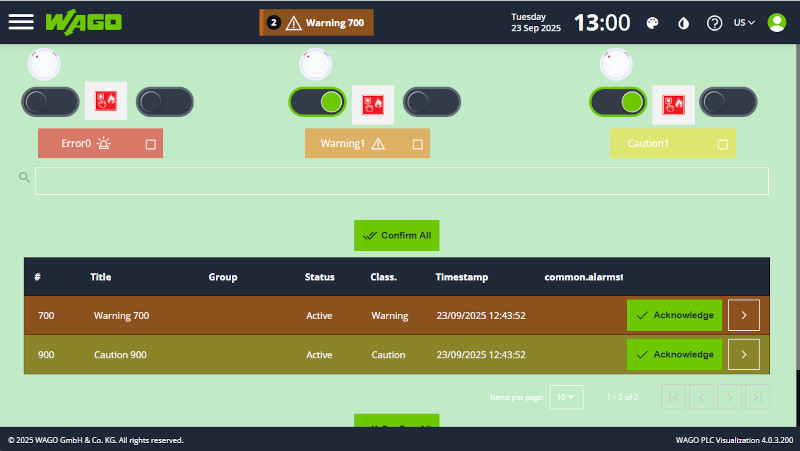
Alarms are a core component of the PLC Visu system. They provide a centralized mechanism for monitoring, recording, displaying, and acknowledging system events.
The alarm functionality consists of three main components:
1. Alarm Administration – Defines and configures alarms.
2. Alarms Front-End – Displays active and historical alarms to the user.
3. CODESYS Back-End – Activates and deactivates alarms based on PLC logic.
Alarm Administration
The Alarm Administration section is used to define and configure the alarms available in the system.
Administrators can:
-
Create and maintain the list of available alarms.
-
Assign alarms to categories.
-
Configure essential alarm metadata, including:
-
msgId
-
Title
-
Inactive Title
-
-
Define placeholders for dynamic alarm parameters.
-
Configure translations for localized alarm messages.
Each alarm should have a unique msgId, which is used by the CODESYS application to identify and control the alarm.
Alarms Front-End
The Alarms Front-End provides the user interface for viewing and interacting with alarms.
It supports:
- Displaying currently active alarms.
- Displaying historical alarms.
- Acknowledging alarms that require user confirmation.
- Displaying localized alarm messages.
- Resolving and displaying parameterized messages using alarm placeholders.
Displaying Alarms
There are several ways to integrate alarms into the user interface.
Menu Integration
An alarm view can be added to the application menu. The following views are available:
-
Alarms – Displays currently active alarms.
-
Alarms History – Displays historical alarms.
-
Alarms Overall – Provides a tabbed view containing both active and historical alarms.
Widget Integration
The Alarm List widget can be added directly to a page using the Page Editor.
To display the current alarms:
-
Open the Page Editor.
-
Add a Widget.
-
Set the widget type to Alarm List.
-
Configure the widget as required.
CODESYS Back-End
The CODESYS back-end is responsible for controlling the alarm state from the PLC application.
Alarm activation and deactivation are performed through variable binding between the CODESYS application and the PLC Visu alarm front-end.
The PLC application determines when an alarm condition occurs and calls the appropriate alarm methods to activate or deactivate the corresponding alarm.
Required Libraries
The following libraries are required to use alarms in a CODESYS project:
-
PLCVisu – Provides the framework for communication and user interface integration.
-
ELA_MessageSystem – Provides the core alarm handling functionality.
Note: ELA_MessageSystem is included as part of the PLCVisu library.
Ensure that the required libraries are referenced by the CODESYS project before implementing alarm functionality.
Symbol Configuration in CODESYS
For alarms to be communicated correctly between CODESYS and the HMI, the relevant alarm variables and structures must be exposed through the Symbol Configuration.
Alarm-related variables must be:
-
Included in the Symbol Configuration.
-
Enabled for external access.
-
Available to the HMI communication layer.
Make sure that all required alarm structures and variables are exposed for external access.
If required variables are not exported, the HMI may not be able to retrieve the alarm state, and alarms may not be displayed correctly.
Alarm Implementation
The alarm implementation is typically divided into two program components:
-
alarmPrg
-
alarmingManagerPrg
alarmPrg
alarmPrg is responsible for initializing the alarm system and processing alarm-related events.
It is typically called from PLC_PRG, although it can also be executed directly from a dedicated PLC task.
A typical application structure may therefore look like:
PLC_PRG âââ alarmPrg
The exact implementation depends on the project architecture and task configuration.
alarmingManagerPrg
alarmingManagerPrg contains the application-specific logic that determines when alarms should be activated or deactivated.
This program evaluates the relevant PLC conditions and calls the alarm handling methods accordingly.
For example, an alarm can be activated when a monitored value exceeds a defined threshold and deactivated when the condition is no longer present.
Alarm Methods
The alarm system provides several methods for controlling alarm states.
setActive
The setActive method activates an alarm and optionally supplies parameters and translation values.
setActive( msgId : UINT, param1 : STRING := '', param2 : STRING := '', param3 : STRING := '', param4 : STRING := '', param5 : STRING := '', trans1 : STRING := '', trans2 : STRING := '', trans3 : STRING := '', trans4 : STRING := '', trans5 : STRING := '', moduleId : UINT := 0 );
Parameters
| Parameter | Type | Description |
|---|---|---|
| msgId | UINT | Unique identifier of the alarm |
| param1–param5 | STRING | Optional parameters used to replace placeholders in the alarm message. |
| trans1–trans5 | STRING | Optional translation values used for localized or dynamic message content. |
| moduleId | UINT | Optional module identifier. Defaults to 0. |
setInactive
The setInactive method deactivates a previously activated alarm.
setInactive( msgId : UINT, moduleIndex : UINT := 0, tag : STRING := '' );
Parameters
| Parameter | Type | Description |
|---|---|---|
| msgId | UINT | Identifier of the alarm to deactivate. |
| moduleIndex | UINT | Optional module index. Defaults to 0. |
| tag | STRING | Optional tag used to identify the alarm instance. |
manage
The manage method provides a simplified mechanism for controlling the alarm state.
It accepts a trigger condition and replaces the need to explicitly call setActive and setInactive.
For example:
alarmingPrg.alarming.manage(444, iErrorTrigger > 95);
In this example:
- 444 is the alarm msgId.
- iErrorTrigger > 95 is the alarm condition. - The alarm is active while the condition evaluates to TRUE.
- The alarm is inactive when the condition evaluates to FALSE.
Using manage is recommended when the alarm state directly corresponds to a Boolean condition.
Example
A typical alarm manager may evaluate several PLC conditions and control the corresponding alarms:
IF iTemperature > 80 THEN alarmingPrg.alarming.setActive(1001); ELSE alarmingPrg.alarming.setInactive(1001); END_IF;
Alternatively, the same logic can be implemented using manage:
alarmingPrg.alarming.manage(1001, iTemperature > 80);
The manage approach reduces the amount of alarm state-management code and ensures that the alarm follows the supplied trigger condition.
Alarm Processing Flow
The complete alarm workflow can be summarized as follows:
CODESYS PLC Logic
│
▼
alarmingManagerPrg
│
│ setActive / setInactive / manage
▼
Alarm System
│
▼
PLCVisu Communication
│
▼
HMI / Alarms Front-End
│
├── Active Alarms
├── Alarm History
└── Alarm Acknowledgment
`
The PLC determines the alarm condition, the alarm system manages the alarm state, and the PLC Visu front-end presents the resulting information to the operator.
Downloads
| Name | Type | Version | Link | ChangeLog |
|---|---|---|---|---|
| CC100_Alarm | PlcVisu project [.gz] | 1.0.0 | Download | 2025-09-22 03:03:47 |
| CC100_Alarm | CODESYS [.projectarchive] | 1.0.0 | Download | 2025-09-22 03:04:05 |
| PFC300_Alarm | PlcVisu project [.gz] | 1.0.0 | Download | 2025-09-22 03:04:58 |
| PFC300_Alarm | CODESYS [.projectarchive] | 1.0.0 | Download | 2025-09-22 03:05:20 |
| WP400_Alarm | PlcVisu project [.gz] | 1.0.0 | Download | 2025-09-22 01:43:03 |